
AI assistant · on your iPhone
Just ask MoveJack about your trips.
The built-in AI assistant gives you instant insight into your trips, distance, time on the road, vehicles and more, using the data MoveJack already has on your iPhone.
The AI runs on your phone. For the assistant, your trip data doesn’t need to go to a MoveJack server.
How it works
Don’t search. Just ask.
No filters, no report menu. Just your question.
1
MoveJack records your trips
Your trips, visits and vehicles are logged automatically.
2
You just ask a question
Type or dictate what you want to know.
3
You get an answer straight away
MoveJack answers from your own data.
What you can ask MoveJack
A few of the questions you can ask. The answer comes from your own trips.
“How far did I drive for business this month?”
Your total business distance, with the amount at the rate you set in the app.
“How many hours was I on the road this week?”
How long you drove, and how long you were parked.
“When was I last at my client Johnson?”
The date and time of your last visit, and how long you stayed.
“Which vehicle did I drive most this month?”
Your trips, distance and time for each vehicle.
“How much CO₂ did my trips produce this month?”
The calculated CO₂ in kilograms, based on your vehicles.
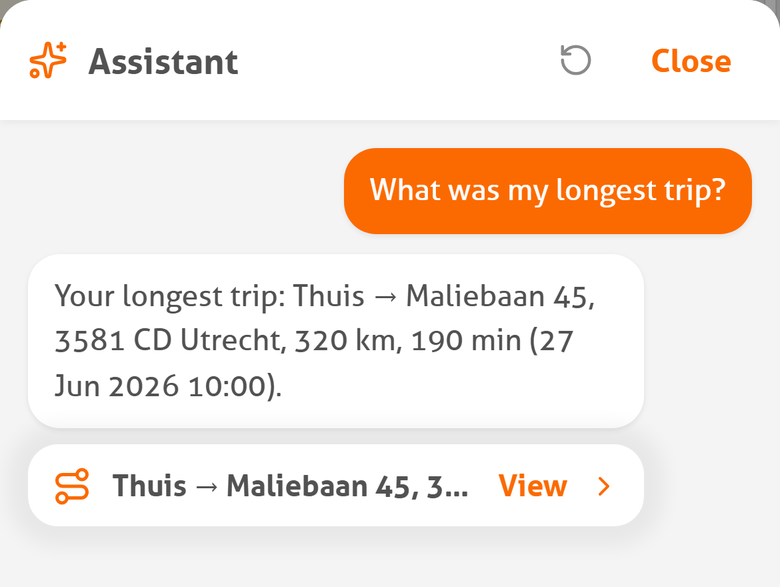
“What was my longest trip?”
Where from and to, how far and how long, with a tap through to the trip.
Privacy
AI without sending your trip history to an AI cloud.
Everything the assistant needs is already on your iPhone.
01
Runs on your iPhone
The AI assistant uses Apple Intelligence on supported iPhones.
02
Works with your own MoveJack data
The assistant uses the data held locally in MoveJack.
03
No upload of your trip history
For an AI question, MoveJack doesn’t need to send your full trip history to a MoveJack server or an outside AI service.
04
You stay in control
Changes made by the assistant ask for your confirmation first.
What do you need?
The AI assistant works on supported iPhones. On Android you get every other MoveJack feature; the assistant isn’t available there at the moment.
iPhone 15 Pro or newer
The assistant uses Apple Intelligence, which needs a recent iPhone.
iOS 26
The assistant works from iOS 26.
Apple Intelligence turned on
Turn on Apple Intelligence in your iPhone’s settings.
The latest MoveJack
Keep the app up to date through the App Store.
Try it yourself.
Download MoveJack and ask your first question. The AI assistant works on supported iPhones.