
Working hours
Your hours are already there. You did nothing for it.
Every time you stop somewhere, MoveJack knows where you are and how long you stay. At the end of the day your timesheet is filled in — all you do is confirm it.
Wednesday 13 August
6 h 40 m worked at 4 locations
- Visit on site
- Break
- On the road
08:19 – 10:02
44 Rowan Street
10:24 – 11:31
Builders’ merchant, Bradford
11:45 – 12:35
Break
13:52 – 17:12
Client Hargreaves
Mileage + hours
Mileage and hours. From one working day, in one overview.
You drive to a client, work there and drive on. MoveJack records the journey, takes your time on site from when you arrived and left, and adds the next journey and the next visit straight after. No two lists, no clocking in.
08:10
Journey
Home → Harris Bakery
08:42 – 10:15
Visit
Harris Bakery
10:15
Journey
→ Patel Plumbing
10:47 – 12:30
Visit
Patel Plumbing
Afterwards
Report
Per client: miles, travel time and hours
What you do with it
- Everything per client: miles at your mileage rate, travel time and time on site at your own hourly rates.
- Check it afterwards: if a stop is wrong, split or merge the journey and your hours follow.
- One report in Excel or PDF for your invoice, your accountant or your employer.
From tracking to admin: see what goes into your report per client
Your trip history stays on your phone, and you decide which trips you share, for example by exporting a report.

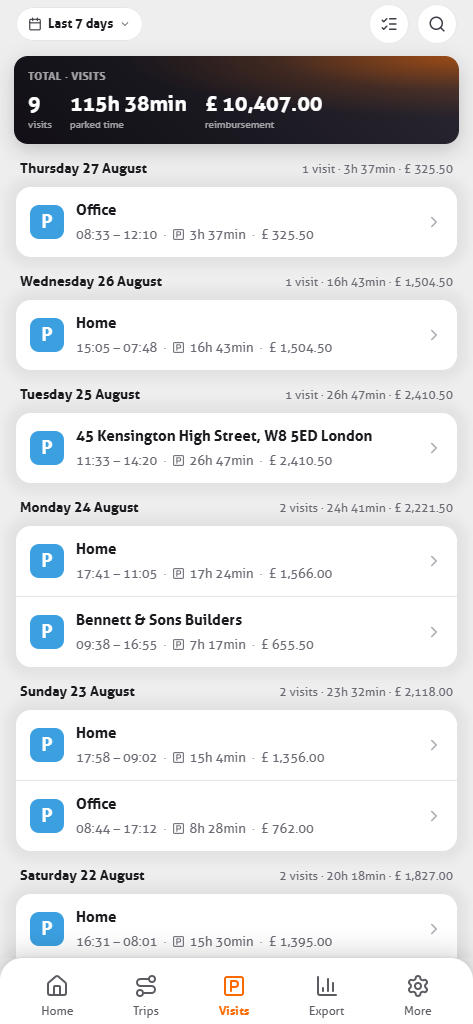
What that changes on an ordinary working day
No notes, no “what time was I there again”
Most self-employed people rebuild their hours at the end of the week — and round down while they do. MoveJack notes the actual time, on the spot, without you starting or stopping anything.
± 3 h
a month that normally goes on catching up timesheets.
Hours per client
Give an address a client name once. From then on MoveJack adds up the hours per client or per job.
Travel time kept apart
On the road and on site are counted separately. Useful when you bill travel differently from work.
Correcting is allowed
Stayed for a coffee at the client’s? Adjust the time, or mark the visit as not billable.
From visit to invoice line
Pick a period and a client and you get an hours summary with date, place, duration and note. Export as Excel or PDF and attach it to your invoice — or send it along directly.
Common questions
How does the app know I am working?
From movement. When you stop somewhere a visit begins; when you drive on, it ends. You start and stop nothing. What counts as a work visit and what does not is your call — once per address.
Do working hours and the mileage log run together?
They come out of the same recording. A journey ends, a visit begins: one is your mileage log, the other your timesheet. You do not need a second app.
Can I export hours per client?
Yes. Pick a period and a client and you get a summary with date, place, duration and note — as Excel or PDF. See the reports.
Are breaks counted?
Only if you want them to be. A visit can be marked not billable: it stays visible in the summary but does not count towards the total.
See at the end of the week what is already filled in.
Three days free, no account, nothing fitted to the car.